SuperSigner

Sign PDFs with your qualified certificate. On a Mac, in 30 seconds.

A native macOS app for PostSignum, I.CA and any .p12/.pfx certificate. No Adobe subscription, no cloud — the document never leaves your computer.

Download for Apple Silicon

Version 1.1 · macOS 11+ · 60 MB Need the Intel build instead?

  • 3 signatures free
  • no sign-up
  • then 1,490 CZK once, forever
Works with PostSignum I.CA eIdentity .p12 / .pfx PAdES-T
SuperSigner

Used by people who sign for a living

Lawyers, accountants, architects and freelancers across Czechia and Slovakia.

„I used to boot a Windows VM just to sign filings for the tax office. Now I drop the PDF in, pick the certificate, done. Paid for itself the first week.“
Martin H. Tax advisor, Brno
„The first tool where my PostSignum certificate just worked on macOS without any configuration. The signature verifies fine in Acrobat and in the data box.“
Petra K. Attorney, Prague
„Bought it for the one-time price alone — Acrobat wanted a subscription for something I do twice a month. It's simple and it's fast.“
Ondřej S. Architect, Ostrava

Three steps, no manual

  1. 1

    Load your certificate

    Pick the .p12 / .pfx file and enter its password. You do this once.

  2. 2

    Open the PDF

    Drag the document into the window or use File → Open.

  3. 3

    Click where the signature goes

    SuperSigner adds a PAdES signature with a timestamp and saves a new _signed.pdf next to the original.

The app: PDF, certificate, position, timestamp
Adobe Acrobat: "Signed and all signatures are valid"
Signature properties: valid, with timestamp
Certificate trusted for signing documents

Why not just use Acrobat?

You can. It costs more, and qualified Czech certificates need manual setup.

Cost over 5 years
SuperSigner: 1,490 CZK
Adobe Acrobat Pro: ≈ 30,000 CZK (subscription, ~6,000 CZK/year)
PostSignum / I.CA certificate
SuperSigner: Load the file, sign
Adobe Acrobat Pro: Manual trust-store setup
Where the document goes
SuperSigner: Stays on your Mac
Adobe Acrobat Pro: Cloud features on by default
Built for macOS
SuperSigner: Native, Apple Silicon & Intel
Adobe Acrobat Pro: Cross-platform suite

One price. No subscription.

Pay once, sign forever. Updates included.

1,490 CZK

one-time, per user

  • Unlimited signatures
  • All future updates
  • Use on all your Macs
  • Invoice by e-mail, license key within minutes of payment
Buy for 1,490 CZK

From 2 licenses: 30 % off each

Not sure yet?

The free version signs 3 documents with every feature unlocked. No sign-up, no card.

Download the free version

Questions people ask before buying

Do I need my own certificate?
Yes. SuperSigner signs with a qualified certificate you already have — it does not issue one. In Czechia you get one from PostSignum (Czech Post), I.CA or eIdentity, typically for 400–500 CZK a year. Export it as .p12 / .pfx and load it into the app.
Will authorities and data boxes accept the signature?
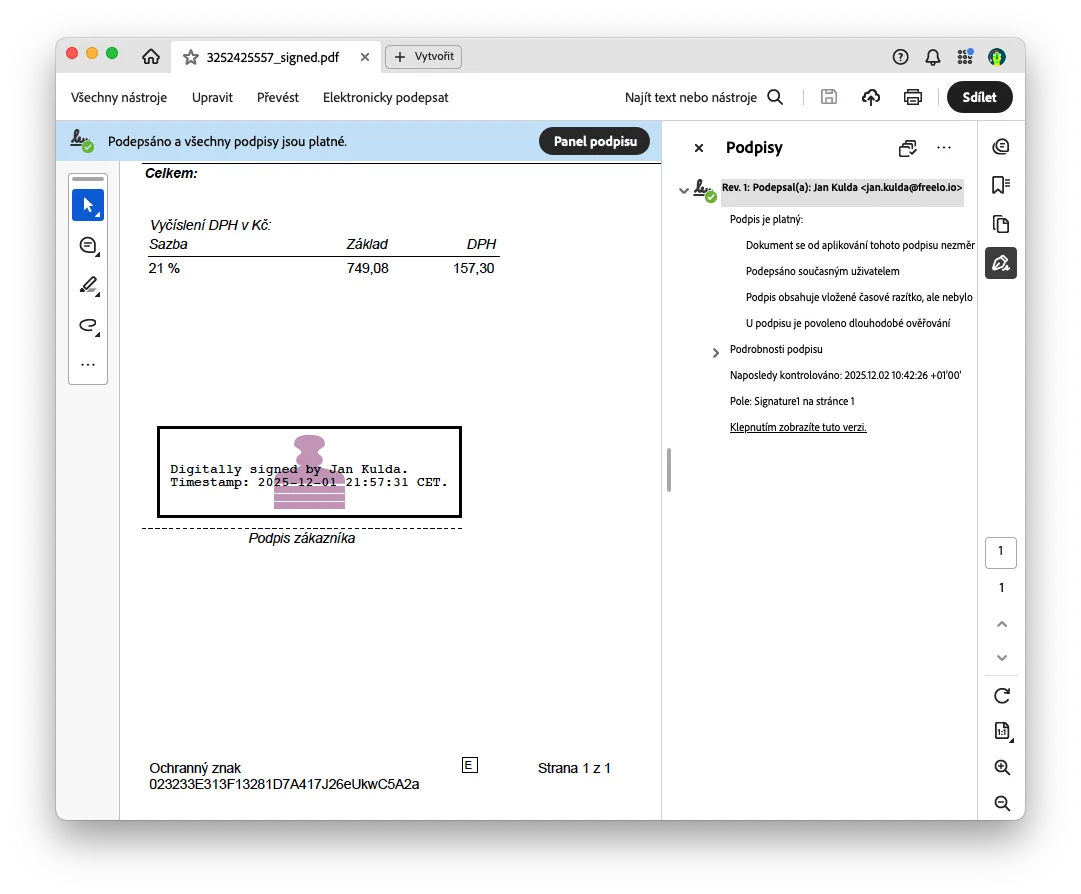
SuperSigner produces PAdES-T signatures (PDF Advanced Electronic Signature with a qualified timestamp), the format required by Czech public administration and verified by Adobe Acrobat, data boxes and court systems. The legal weight comes from your certificate; the app only applies it correctly. Adobe Acrobat: "Signed and all signatures are valid" on a PDF signed with SuperSigner
macOS says the app "could not be verified". What now?

That is the standard macOS warning for apps distributed outside the App Store. It does not mean the app is unsafe, and you handle it once.

macOS 15 Sequoia and newer: click Done, then System Settings → Privacy & Security → Open Anyway.

macOS 14 Sonoma and older: right-click SuperSigner → Open.

Illustrated step-by-step guide →

Can I sign a Word document?
Export it as PDF first (File → Save As → PDF in Word or Pages), then sign the PDF. Authorities expect PDF anyway, and the layout stays intact.
Does the document go anywhere?
No. Signing happens on your Mac. The only network request is the timestamp (TSA), which sends a hash of the document — never the document itself. Without internet you still get a basic signature, without the timestamp.
How many computers, and what about updates?
One license is for one person on all their Macs. Updates are included for good — there is no version 2 to pay for.
How does buying work?
Click Buy, enter your e-mail and billing details, pay by bank transfer (QR code for Czech accounts, IBAN otherwise). The license key arrives by e-mail once the payment clears, together with the invoice. Nothing is charged automatically, ever.

Download SuperSigner

Free version included — 3 signatures, every feature, no sign-up.

Download for Apple Silicon

Version 1.1 · macOS 11+ · 60 MB Need the Intel build instead?

Which one do I have?

Apple menu → About This Mac. "Chip: Apple M…" means Apple Silicon; "Processor: Intel…" means Intel.

Install in a minute

  1. 1Open the downloaded .dmg
  2. 2Drag SuperSigner into Applications
  3. 3First launch: allow it in System Settings Step-by-step guide

No certificate yet? How to get one from PostSignum